


A customer recently reached out to us for some basic advice on setting up an AI policy for his organization. It’s a question we suspect a lot of organizations are asking right now. Because here’s the thing: If your organization hasn’t written an AI policy yet, that doesn’t mean your employees aren’t using AI. It probably just means everyone is making up their own rules.
Someone is using ChatGPT to polish an email. Someone else is asking Copilot to summarize a meeting. Another person has discovered an AI tool that turns three hours of work into twenty minutes and is understandably delighted with themselves.
None of this is necessarily bad. Organizations should want employees experimenting with AI and finding ways to work more efficiently. But there’s a big difference between encouraging experimentation and having no idea what information people are feeding into which AI systems. That’s where some sensible AI guidelines come in.
So, with that in mind, I put together a simple step-by-step guide to creating AI guidelines for your organization, along with a handy table of the guidelines you can save, share, or print out for future reference.
Step One: Find Out What’s Already Happening
Before writing a policy, find out how employees are actually using AI. Ask which tools they use, what they use them for, whether they have free or paid accounts, and what kinds of information they enter into them.
This doesn’t need to feel like an investigation. You’re trying to understand what’s happening, not catch someone asking ChatGPT to make the quarterly report sound less boring.
You may discover people using AI for research, meeting notes, writing, spreadsheets, coding, translation, or dozens of other tasks. That gives you a much better starting point than downloading a generic AI policy from the internet and hoping it applies to your organization.
Step Two: Decide What’s Off-Limits
Employees need to know what they can and cannot put into an AI system. Confidential client information? Employee records? Financial data? Personally identifiable information? Internal strategy documents? Your guidelines should make the boundaries clear.
The rules may differ depending on the platform. An enterprise AI service with appropriate security and data protections may be approved for information that should never be pasted into a free consumer chatbot.
That distinction is important. Employees shouldn’t have to make complicated data-security decisions every time they open an AI tool.
Step Three: Create an Approved AI Toolbox
You don’t want employees signing up for every shiny new AI service that appears online, but you don’t want to squash useful experimentation either.
Create a list of approved AI tools and what they can be used for. Then establish an easy process for requesting something new. Someone should review its security, privacy, licensing, data retention, and other risks before it becomes part of the organization’s technology collection.
Think guardrails, not roadblocks.
Step Four: Keep a Human in Charge
AI can produce remarkably convincing nonsense. Your guidelines should therefore make one thing unmistakably clear: AI can help create the work, but a human owns the result.
Employees should verify important facts, calculations, citations, recommendations, and other AI-generated information. The higher the stakes, the greater the level of human review.
You should also address copyright, bias, inappropriate content, and situations where AI use should be disclosed. No policy can anticipate every scenario, so one old-fashioned rule still works surprisingly well: if something feels sensitive, questionable, or unusually consequential, ask before doing it.
Step Five: Train People
You can write the world’s greatest AI policy, put it in SharePoint, email everyone a link—and confidently assume that roughly six people will read it.
Training makes the policy real. Show employees examples of acceptable and unacceptable AI use, explain what information shouldn’t be entered into certain systems, and teach them to recognize hallucinations and verify important answers.
Just as importantly, show people what they can do with AI. The goal is safe adoption, not making employees afraid to touch it.
A Simple AI Guidelines Checklist
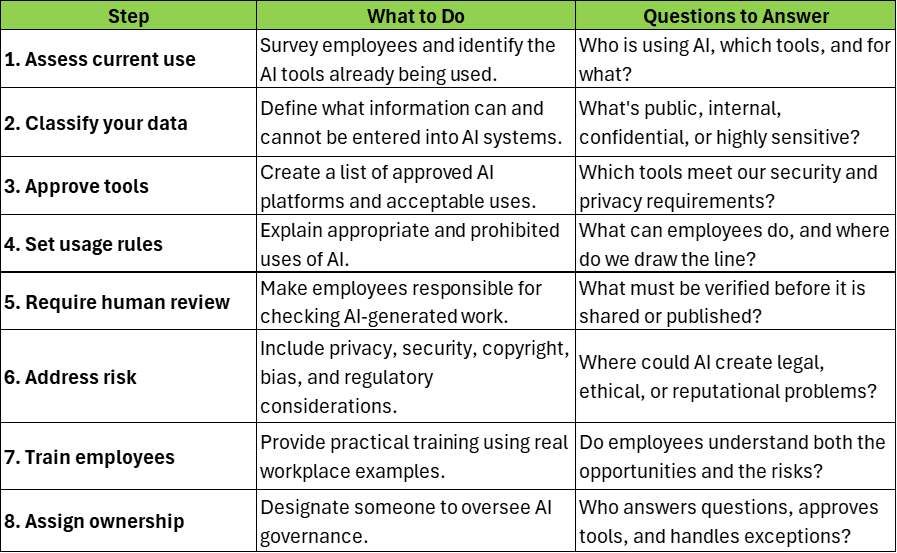
Don’t Carve It in Stone
AI is changing far too quickly for a policy written today to sit untouched for five years. New tools appear, existing platforms gain new capabilities, regulations evolve, and employees discover uses nobody anticipated.
Assign someone responsibility for reviewing the guidelines periodically and give employees a way to raise questions or suggest changes. You don’t need to rewrite the policy every time ChatGPT gets a new button, but you should revisit it when your technology, risks, or use of AI meaningfully changes.
Most importantly, remember what the policy is supposed to accomplish. The goal isn’t to stop AI. It’s to make AI useful without creating unnecessary security, privacy, legal, or reputational risks.
There are two bad approaches to AI governance: “Nobody is allowed to use AI” and “Have fun, everybody!”
A good policy lives comfortably somewhere in between.
For over forty-three years, CGNET has provided state-of-the-art IT services to organizations of all sizes, across the globe. We’ve done it all, from IT and cybersecurity assessments to cloud services management to generative AI user training. Want to learn more about who we are and how we might be able to help you? If so, check out our website or send us a message!



0 Comments