


There are three certainties in life: death, taxes, and Microsoft renaming a product approximately six minutes after you finally learn what it does.
If you’ve been using Microsoft products for any length of time, you’ve probably experienced this. You hear about Microsoft Entra ID and wonder if your organization needs it—only to discover you already have it. You just knew it as Azure Active Directory. And with Copilot, Defender, Purview and the ever-expanding Microsoft 365 family, keeping the names straight has practically become an IT specialty.
So here’s my attempt to translate.
Azure AD → Microsoft Entra ID
This is probably the rename most likely to make longtime Microsoft administrators mutter under their breath.
Azure Active Directory (Azure AD) is now Microsoft Entra ID.
Importantly, Microsoft didn’t replace Azure AD with an entirely new identity system. The name changed as Microsoft brought its identity and access products together under the Entra brand. Your familiar users, groups, authentication and Conditional Access didn’t suddenly disappear.
Also important: regular old Active Directory is still Active Directory.
So Azure Active Directory isn’t Azure Active Directory anymore, but Active Directory is.
Glad I cleared that up.
Office 365 → Microsoft 365…Mostly
Remember Office 365? Of course you do. In fact, there’s a decent chance you still call it that.
Microsoft shifted much of the Office 365 branding to Microsoft 365, reflecting the fact that the platform now includes far more than Word, Excel, PowerPoint and Outlook. Depending on your plan, Microsoft 365 can encompass collaboration, identity, security, device management, AI and other services. Some Office 365 enterprise plan names, however, still exist.
Even the Microsoft 365 app has gotten another makeover: it’s now the Microsoft 365 Copilot app.
At this point, “Office” is a bit like the Sears Tower. You can change the official name, but good luck getting everyone to stop using the old one.
Copilot → Which Copilot?
Then there’s Copilot. Microsoft apparently liked the name so much that it started putting it everywhere. There’s Microsoft Copilot, Microsoft 365 Copilot, the Microsoft 365 Copilot app, GitHub Copilot, Security Copilot and Copilot Studio—not to mention Copilot experiences inside Word, Excel, Outlook, Teams and other Microsoft products.
The result is that saying, “We’re getting Copilot” is roughly as specific as saying, “We’re getting a Microsoft product.”
The important question is: Which Copilot, for whom, and with what license? And if you’re still confused, don’t worry. By the time you’ve memorized all of them, there will probably be another one.
Defender → Please Be More Specific
Defender has a similar problem. What began as a familiar Windows security name has grown into a family that includes Microsoft Defender for Endpoint, Defender for Office 365, Defender for Identity, Defender for Cloud Apps, Defender for Cloud and Microsoft Defender XDR, among others.
So when someone tells you, “Don’t worry, we have Defender,” it’s worth asking a follow-up question.
It’s a little like saying, “We’re covered. We have insurance.”
Car? Health? Homeowners? Dental?
Defender?
Details matter.
And Then There’s Purview
Microsoft Purview is where a number of Microsoft’s data governance, information protection, risk and compliance capabilities have come together.
Microsoft introduced the Purview family by combining capabilities from the former Azure Purview and Microsoft’s Microsoft 365 compliance portfolio. Information-protection capabilities that longtime administrators may associate with Azure Information Protection have also increasingly moved under the Purview umbrella.
Today, Purview includes tools for things like information protection, data loss prevention, auditing, eDiscovery, records management and compliance.
If you’re thinking, “I’m pretty sure some of that used to be somewhere else,” you’re catching on.
The Microsoft Name-Change Cheat Sheet
Here’s the short version to keep handy:
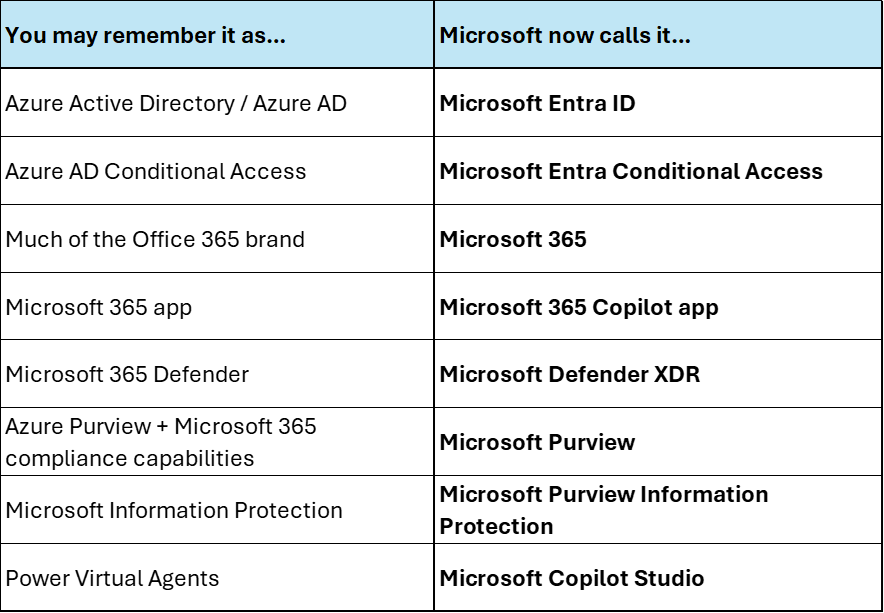
Print this out. Laminate it. Keep it next to your computer.
(Although I make no guarantees that it will still be accurate by the time the laminator warms up.)
Why This Actually Matters
It’s fun to poke at Microsoft for its naming habits, but there is a legitimate problem underneath the jokes. Old names don’t disappear when Microsoft announces new ones. They remain in internal documentation, training materials, Google searches, old support articles and, most stubbornly, people’s heads. That can make it surprisingly difficult to understand what your organization already owns, which licenses you actually need and whether the “new” Microsoft product someone just mentioned is truly new—or something you’ve been using for five years under another name.
The technology itself is complicated enough. Figuring out what Microsoft decided to call it this week shouldn’t make it harder.
At CGNET, keeping up with Microsoft’s evolving products, licensing and terminology is part of what we do. So if you still occasionally say Azure AD or Office 365, don’t worry. We know what you mean.
And chances are, Microsoft will rename something else soon enough to make us all beginners again.
For over forty-three years, CGNET has provided state-of-the-art IT services to organizations of all sizes, across the globe. We’ve done it all, from IT and cybersecurity assessments to cloud services management to generative AI user training. Want to learn more about who we are and how we might be able to help you? If so, check out our website or send us a message!



0 Comments